
Most time tracking rollouts fail in the announcement, in how it is presented to the team. The tool itself is rarely the problem since most time tracking tools work more or less the same way.
Usually, teams pay more attention to choosing the right tool rather than discussing the concept of time tracking with the team carefully. They compare pricings, integrations, join demos and make a decision. But once they roll out the time tracker, the rest of the team starts feeling like they are being monitored.
Research suggests how expensive that reaction can be. Across two studies published in Harvard Business Review, researchers found that monitored employees were substantially more likely to break rules like cheating on a test, taking office equipment, or deliberately working at a slower pace. Monitoring lowered their sense of personal responsibility for their own conduct. The same research found that employees who felt they were being treated fairly did not experience that drop in agency.
Fairness here comes down to practical choices. What you tell people, when you tell them, how you configure the tool, and what you do with the first month of data.

Why time tracking rollouts damage trust
The first and biggest issue when it comes to time tracking rollouts is inadequate information. That’s it. It is not the timer.
What they react to is not knowing where the data goes and who reads it.
A Pew Research Center survey found that 61% of U.S. adults opposed employers using AI to track workers’ movements on the job, with majorities also opposing the tracking of computer activity and of how often workers take breaks.
That’s why the top two questions that decide how the announcement lands are:
- What data exactly are you going to track?
- What that data is going to be used for?
Note that you shouldn’t wait for the team to start asking questions but should start by answering these questions before the rollout.
Decide what you need to track before you shortlist tools
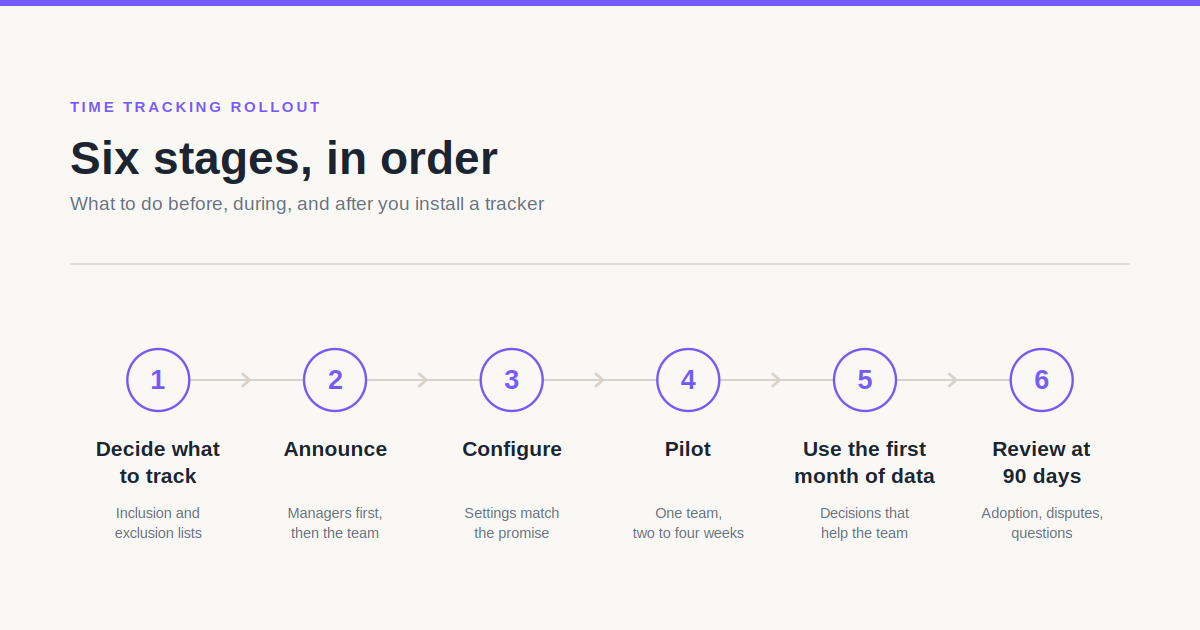
Match tracking depth to the business problem
Client billing accuracy, payroll processing, compliance records, and capacity planning each need a different level of detail. That is why depending on your company processes you might need a different time tracker.
Some time trackers offer merely time logging, while others expand into complete workforce management tools. For example, if the actual problem is that invoices are consistently wrong, mere hour logging per project is enough. A time tracker with screenshots will not fix the issue here and might even add to the internal resistance.
Write down what you will not track
Other than the inclusion list, there is also an exclusion list that carries an equal weight in the announcement.
These can be personal devices, screen tracking, activity outside working hours, private messages, location, and so on. Naming these explicitly does more for trust than any amount of reassurance about good intentions, because it converts a promise into a constraint someone can hold you to.
Announce the rollout before anyone sees the timer
Do not roll out without informing. Just don’t. It is only going to cause trust issues and resistance. Instead, brief your managers and only then tell the whole team.
Discovering a tracking tool already running on their machine is sure going to cause resignations.
Both the announcement and manager briefs need to answer five things:
- What exactly gets recorded
- Who can see it
- How long it is kept
- What decisions it will inform
- What it will never be used for
Name the business reason in plain language. For example, “We are losing billable hours between project handoffs and it is costing us roughly a day a week” gives people something concrete to evaluate.
At the same time, give people a channel for objections and a named person who will be responsible for providing answers. This way you are giving your team members a chance to feel free to raise any questions and concerns they might have, knowing that they will be replied to professionally and without fearmongering.
Configure the tool to match what you promised
Now that you have selected a time tracker, it is time to configure the settings. Note that not all time trackers suggest the same level configuration. So depending on your selected tool, set up the following:
- Access permissions so only managerial roles have access to sensitive data
- Shifts so each employee has their worked hours match their shift
- Set up timesheet settings like whether they require approval or not
- If you use monitoring features, set screenshot types, frequency and blur levels
WebWork’s screenshot settings, for example, offer a high level of configuration. You can select between no screenshots, screenshots and video screenshots which can be taken from 1-10 times per 10 minutes and be blurred to your desired level. They can be configured per project, per member or per workspace, giving you a complete level of control. Plus, blurring can be applies to certain types of apps, such as communication, meetings, and such.
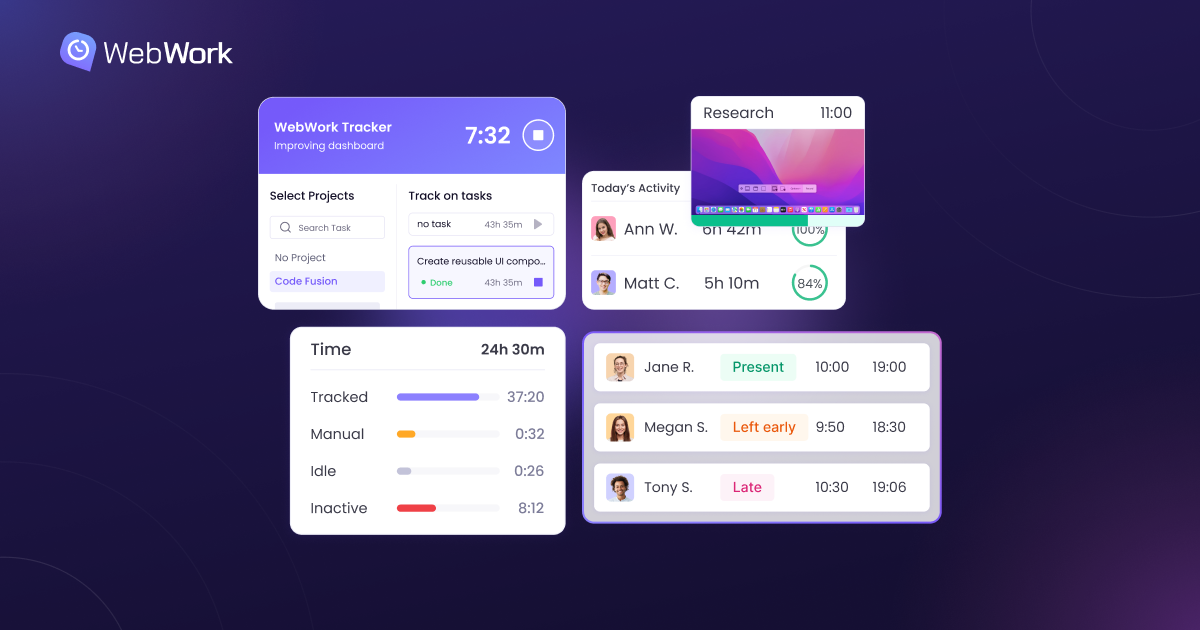
That range means one tool can support two very different rollouts. A design team reviewing client deliverables might use standard screenshots while a support team handling customer records might use blur mode.
If you told the team monitoring would be transparent, use the visible mode where employees start and stop the timer themselves. If instead you opt for silent tracking, it will contradict a transparency promise, and employees will find out, leading to more resentment and distrust.
Set access permissions with the same deliberation. Decide which managers can access their team member’s data and to what degree so a manager of one team don’t see the screenshots of another team.
Get the legal and privacy requirements right
Notice is a legal obligation in a growing number of jurisdictions as it should be.
Under Section 52-c of the New York Civil Rights Law, effective May 2022, private employers who electronically monitor phones, email, or internet usage must give written notice to new employees on hiring and obtain acknowledgment, plus post the notice conspicuously for existing staff.
For teams in the UK and EU, the ICO’s guidance on monitoring workers requires a lawful basis for any monitoring and recommends a Data Protection Impact Assessment where monitoring reaches into people’s homes. The guidance notes that workers reasonably expect more privacy at home than in an office, and that covert monitoring is very difficult to justify outside exceptional circumstances such as investigating theft.
That’s why a written policy with signed acknowledgment covers the compliance requirement.
Pilot with one team before going company-wide
To understand whether the tool and the approach you have chosen are right for the company, start with one team. Two to four weeks with a single team, ideally a team that volunteers, will surface the exact problems that you will learn to prevent with the rest of the company.
You will learn which settings need adjustment, which parts of the policy people misread, how much time the daily routine actually adds, and whether the reports are as useful as expected. You also finish the pilot with a group of colleagues who can respond to questions from their own experience, which lands differently than an HR announcement.
Then publish what you changed based on their feedback. For example, you might adjust screenshot frequency because the pilot team said the original setting was distracting.
This single act might do more for a company-wide rollout than any communication plan drafted in advance.
Use the first month of data for decisions people will benefit from
Whatever you do first with the tracked data defines how your team will perceive the system going forward.
Strong first uses can be rebalancing someone’s overloaded week, correcting a payroll error in the employee’s favor, or spotting burnout and so on.
Some platforms flag the last one directly. WebWork’s burnout risk feature monitors four signals:
- working beyond a set healthy daily limit
- working outside the scheduled hours
- going without breaks in a defined window
- sustained high activity with no pauses
Used early, these wellbeing flags reframe the time tracking system as a tool for watching workload rather than people.
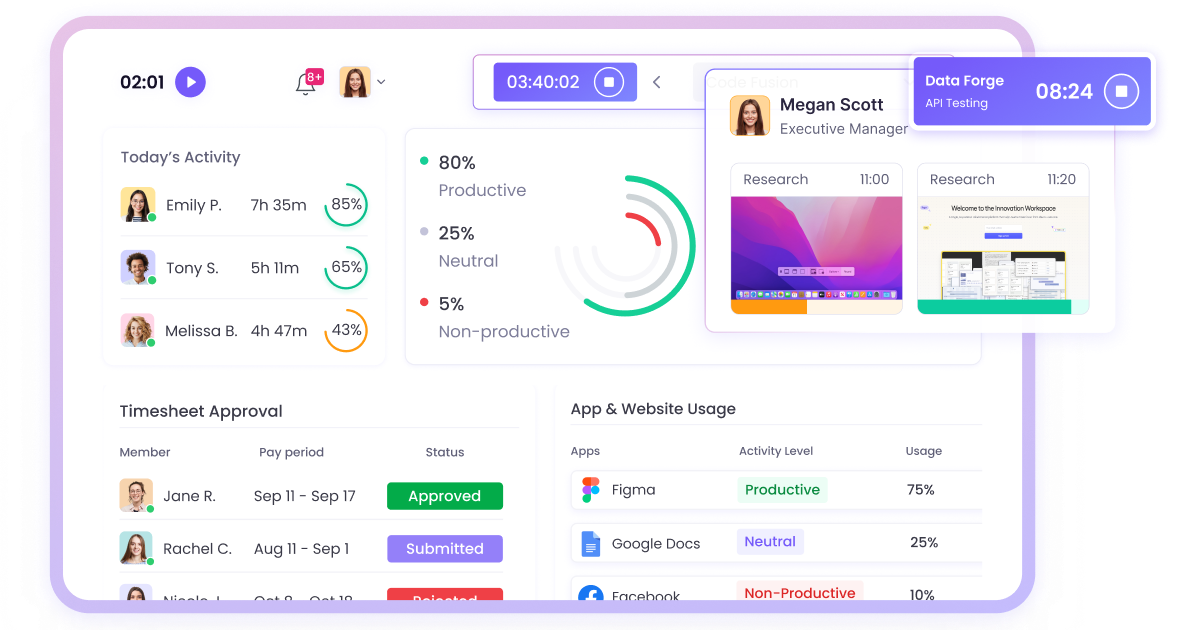
One caution on activity scores. Activity level is calculated from mouse clicks, scrolls, and keystrokes, which measures input rather than output. For example, a developer working through an architecture problem registers low activity, while someone copy-pasting between spreadsheets registers high activity. That is precisely why you should evaluate these two people’s performance differently and not based on activity level scores.
What to measure in the first 90 days
In the first 90 days, you should track the rollout itself by measuring the following employee engagement criteria like:
- Adoption — how many people track without a reminder
- Timesheet edits and disputes, which should fall as habits settle
- Questions reaching managers, and whether the written policy already answers them
- One pulse survey question asking whether people understand what is tracked and why
If the fourth item scores poorly at 90 days, the problem is again communication rather than configuration. Rewrite the policy, hold a short session, answer the questions that keep coming back. That is a far smaller fix than replacing the software, and it is the fix most teams actually need.
Give the rollout the same attention you gave the tool
Time tracking works when your team understands and accepts it. Tell your team what you are tracking and why. Answer their questions. Configure the tool the way you said you would. Then use the first month of data to fix something that helps them.
Once your team sees benefits, time tracking will become a natural part of your company’s workflow.