
The Digital Upgrade That Didn’t Go as Planned

Imagine a fast-growing urban clinic that finally invests in a clinic management system. On paper, the rollout promises everything modern healthcare software should: streamlined billing, digitized patient records, faster scheduling, and fewer administrative errors.
But six months in? The clinic is overwhelmed. The EMR implementation is half-used, physicians complain about usability, workflows are more fragmented than before, and operations are stalling.
A study conducted by the American College of Physicians and cited in JAMA Internal Medicine reported that physicians lost an average of 48 minutes of free time per day after implementing EMR, largely due to inefficient system design and documentation workflows. Separately, a time-motion analysis by Tai-Seale et al., published in JAMA Internal Medicine (2017), revealed that physicians split their day almost evenly between face-to-face patient visits (3.08 hours) and desktop medicine tasks (3.17 hours)—highlighting the consequences of misaligned clinic management system configurations and insufficient clinician input during system selection.
While a clinic management system software (CMS) is a critical investment for operational efficiency and digital transformation, the way it’s implemented makes all the difference. A rushed or poorly aligned CMS rollout can lead to lower adoption, inefficient workflows, and poor return on investment (ROI).
Here we walk you through the full clinic management software implementation timeline, revealing ten costly mistakes clinics make—from the initial decision-making phase to post-launch sustainability. Along the way, we’ll explore proven strategies to avoid these pitfalls and ensure your CMS delivers real, lasting value.
Clinics that adopt a structured, multi-phase implementation model—like the one embedded in platforms such as Medinous—often see faster onboarding, fewer post-go-live issues, and better long-term outcomes.
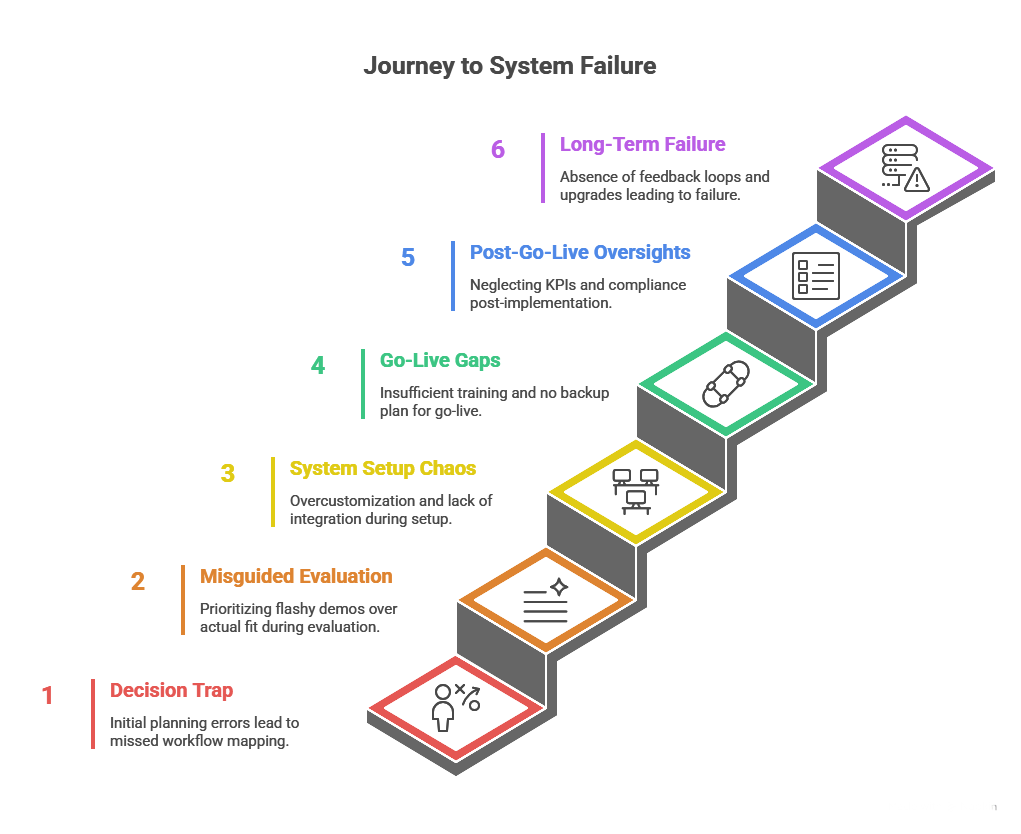
STAGE 1: THE DECISION TRAP
Mistake 1: Implementing Without a Workflow Blueprint
Many clinics jump headfirst into vendor demos, excited by features but oblivious to their internal gaps. They pursue clinic software without auditing how their teams actually work.
Why it fails:
- No defined SOPs across departments
- Clinical, billing, and pharmacy workflows not mapped
- Decision-making driven by surface-level needs
What to do instead:
Begin with a formal internal audit. Map out existing workflows, current system pain points, and future needs. Involve key users across departments—clinical, administrative, billing, and pharmacy. Use this blueprint to create a requirements document for management software for clinics that will guide product evaluation.
STAGE 2: Misguided Solution Evaluation
Mistake 2: Prioritizing Visual Appeal Over Operational Fit
A sophisticated user interface or a visually engaging product demonstration can be compelling. However, selecting a clinic management software solution based primarily on its aesthetic presentation—rather than its ability to address the clinic’s day-to-day operational requirements—often leads to suboptimal outcomes and implementation challenges.
Key risks of this approach include:
- Functional limitations masked by an appealing dashboard
- Poor alignment with existing clinical and administrative workflows
- Inability to support specialty-specific needs or multi-department configurations
How to avoid this mistake:
Develop a comprehensive feature-fit evaluation matrix grounded in your clinic’s real operational scenarios. Prioritize core functionality over design aesthetics. Assess whether the healthcare software can effectively manage tasks such as handling walk-in consultations, processing e-prescriptions, resolving claim rejections, and coordinating multi-location schedules. Additionally, ensure the solution adheres to region-specific compliance mandates to future-proof your investment.
STAGE 3: Suboptimal System Configuration
Mistake 3: Overcustomizing the System Too Early
In an attempt to tailor every feature to their preferences, many clinics overly customize their healthcare management software during initial deployment. While the intention is to replicate legacy processes, excessive customization introduces long-term complications—ranging from delayed rollouts to higher maintenance costs and reduced flexibility.
Platforms like Medinous advocate for a phased configuration approach, allowing clinics to refine workflows post-launch based on actual user behaviour.
Common pitfalls include:
- Redesigning standard patient intake workflows unnecessarily
- Creating custom reports without validated use cases
- Hard-coding workflows that resist future scaling or upgrades
How to avoid it:
Adopt a phased configuration approach. Begin with out-of-the-box templates provided by the vendor and activate only essential modules for go-live. Collect usage insights over 30–90 days, then customize based on real operational needs.
Mistake 4: Neglecting Integration and Interoperability
Failure to evaluate system compatibility with ancillary solutions—such as diagnostic labs, pharmacies, billing systems, or national health networks—can significantly impair operational continuity. In today’s digitized healthcare landscape, interoperability is not optional; it is foundational.
Consequences of poor integration planning:
- Manual data entry between systems, increasing human error
- Incomplete patient records due to siloed data
- Delayed insurance reimbursements or compliance issues
How to avoid it:
Ensure your selected clinic management platform supports standardized protocols like HL7, FHIR, or regional APIs. Discuss existing integration capabilities with lab information systems, pharmacy modules, and e-claim gateways during vendor evaluation.
STAGE 4: Inadequate Deployment Planning
Mistake 5: Underestimating the Training Requirements
Even the most intuitive clinic management software will fall short if end-users lack adequate training. Clinics that minimize onboarding efforts typically encounter usage inconsistency, staff resistance, and incomplete data entry, especially in EMR and billing modules.
Common warning signs:
- Staff reverting to paper-based documentation
- Incorrect or incomplete entries in EMRs
- Prolonged appointment scheduling times
How to avoid it:
Invest in role-based, hands-on training well before go-live. Develop curricula for administrative, clinical, and billing teams, and conduct simulations using real-life workflows.
Mistake 6: Failing to Establish a Go-Live Contingency Plan
A well-structured go-live plan is critical to ensuring operational continuity. Clinics that neglect contingency protocols are more likely to encounter workflow disruption, patient dissatisfaction, and reputational risk during transition.
Risks of unplanned go-live events:
- Missed consultations due to login issues or system crashes
- Delayed diagnoses and treatments
- Negative patient experience impacting retention
How to avoid it:
Develop a comprehensive launch readiness framework. This includes fall back paper templates, a pre-assigned incident response team, vendor escalation points, and soft launch simulations.
STAGE 5: Post-Deployment Oversights
Mistake 7: Neglecting to Define Performance Benchmarks
A significant number of clinics proceed with clinic management system deployment without setting clear performance indicators. In the absence of defined benchmarks, it becomes nearly impossible to assess system efficacy, identify improvement areas, or justify ROI.
Key indicators often overlooked include:
- Patient wait times
- Claim rejection rates
- Billing turnaround time
- EMR documentation completion rates
How to avoid it:
Establish key performance indicators (KPIs) prior to go-live. Use historical data to establish baselines, then monitor improvements at 30-, 60-, and 90-day intervals.
Mistake 8: Overlooking Regulatory Compliance and Data Security
Assuming that a clinic software provider is inherently compliant with data protection regulations is a critical misstep. Healthcare providers operate under stringent mandates, and any deviation—intentional or not—can result in audits, penalties, or reputational damage.
Compliance risks include:
- Failure to meet data encryption and storage standards
- Inadequate access controls or audit logging
- Violation of local healthcare data regulations
How to avoid it:
Request documentation confirming adherence to regulations. Review hosting infrastructure, encryption protocols, user access management, and audit trail mechanisms.
STAGE 6: Sustainability Failures
Mistake 9: Treating the CMS as a One-Time Purchase
Many healthcare facilities treat their clinic management software as a “set-and-forget” investment. However, without a structured plan for long-term system evolution, clinics risk falling behind on updates, ignoring emerging user needs, and losing staff engagement over time.
Clinics that continue to evolve—often in collaboration with solution providers like Medinous—tend to extract greater long-term value from their investment.
Common symptoms of stagnation:
- Diminished feature utilization over time
- Fragmented data across departments
- Increased reliance on workarounds or third-party tools
How to avoid it:
Schedule quarterly system usage reviews. Collect feedback from each department and track how effectively the CMS supports operational goals. Maintain ongoing collaboration with your vendor to receive updates, training refreshers, and new feature rollouts.
Mistake 10: Skipping the Feedback Loop
Finally, ignoring staff feedback post-go-live is a silent killer. Clinicians and front-desk teams often have critical insights—but no platform to share them.
Missed opportunities include:
- UI suggestions to reduce clicks
- Workflow tweaks that save time
- Identifying underused modules
Solution:
Set up structured feedback forums 30–60 days after launch. Involve a cross-functional team to assess and act on inputs.
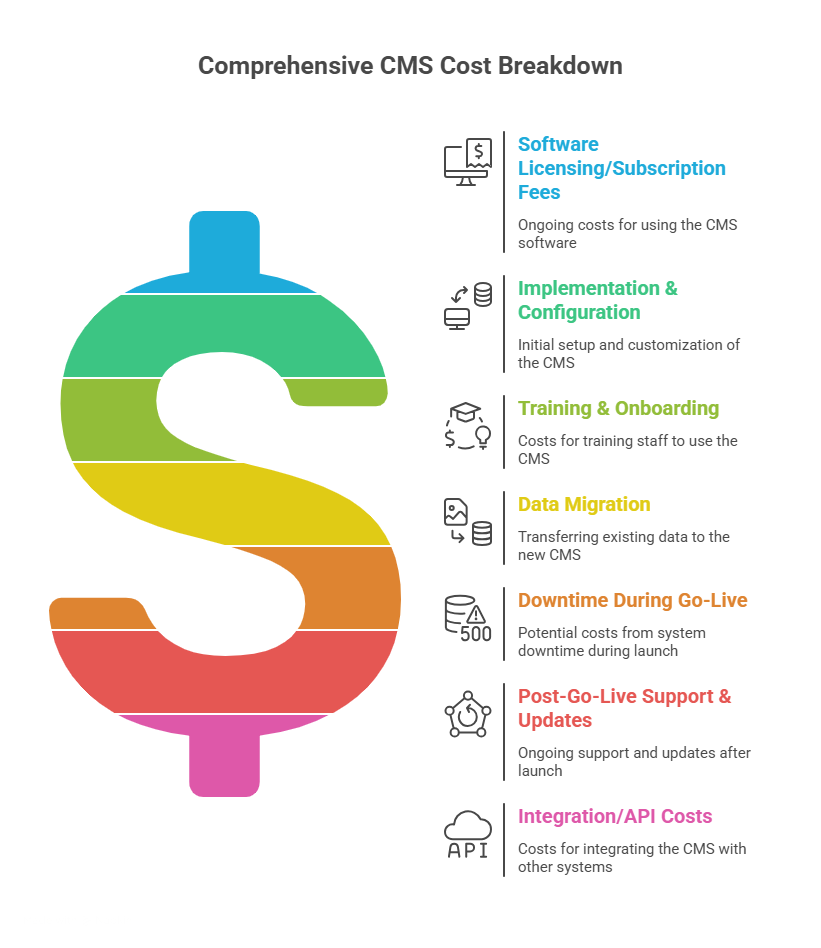
How to Reverse the Implementation Pitfalls
Avoiding all implementation errors is unlikely—but designing your rollout to anticipate and adapt to real-world challenges is entirely possible. Clinics that succeed with their healthcare management platforms adopt a fundamentally different approach:
- Start with workflow mapping, not software demos
- Build cross-functional evaluation committees that include clinical and admin roles
- Implement standard configurations and evolve based on usage data
- Define success with measurable KPIs
- Stay engaged with the vendor post-launch through structured reviews and support
Whether you are transitioning from legacy systems or deploying a CMS for the first time, working with partners like Medinous—who offer implementation toolkits, local compliance alignment, and continuous improvement frameworks—can be instrumental in ensuring your deployment leads to tangible operational gains.
Conclusion: Build Intelligently, Scale Sustainably
Selecting and implementing a clinic management system is a pivotal decision in a clinic’s digital transformation journey. Done poorly, it introduces risk and inefficiency. Done well, it lays the foundation for scalable growth, enhanced patient care, and administrative clarity.
By recognizing the common pitfalls and approaching implementation with clear intent, cross-functional planning, and measurable goals, clinics can significantly enhance the return on their software investment—not just at the point of go-live, but across the entire lifecycle of their digital infrastructure.
Your CMS rollout doesn’t need to be flawless. It just needs to be intentional.
For clinics preparing to evaluate new systems—or revisit their current setup—it may be worthwhile to engage in product walkthroughs or implementation consultations that demonstrate how real-world challenges are managed in practice.